How you’ll make a great survey, step by step
Candor helps at every step, from your first question to the report you hand over, so you know your survey is ready before everyone sees it.
Or just take a real survey built in Candor Surveys, and see for yourself →
Start here
Start with a template and follow a clear path.
Ready-made templates
Employee feedback, event planning, course evaluations, community surveys, and more. Pick one and make it yours.
Help that’s already there
As you work, help appears before you need to ask. Building for the first time? Tips as you go. Coming back after months? Everything picks up where you left off.
Your work is always here
Surveys, responses, and settings — all here when you come back. When a paid Candor subscription ends, your results stay accessible to you until you close your account.
Help beside you while you build, on a laptop and on a phone


Add questions. Reorder them. Change your mind.
Add a question. Drag to reorder. Change your mind anytime.
Click to add any question type
Single choice, multiple choice, open text, grid questions, rating scales, side-by-side comparisons, and ranked lists — click to add, drag to reorder. Organize with sections.
Preview before anyone sees it
See exactly how your survey looks on desktop and mobile before you share it. Nothing you enter in preview is saved.
Published isn’t permanent
Edit your survey after publishing. Pause and resume collection. Made a wrong turn? Go back. Your work is always recoverable.
A rehearsal before the real send
In Pilot mode, a survey goes to a few people you trust while it is still a draft. Their notes come back on the questions that gave them trouble, and you find out how far each person got before you send it to everyone.
Send your survey. See responses roll in.
One link works everywhere — email, text, social media. Responses arrive in real time.
One shareable link
Email it, text it, post it. Respondents take your survey wherever they are — phone, tablet, or desktop. No app needed.
Response tracking
See how many people have responded in real time. Filter by source to understand where responses are coming from.
Conditional questions
Show or hide questions based on previous answers. Keep your survey focused and relevant for each person.
The page you share it from: the link, a QR code, email, and the count as it grows


Ready to try it?
Start your first survey freeCharts, drill-downs, and exports
What you’ll see once people start answering.
Professional charts
Bar, column, and pie charts with ColorBrewer palettes designed for accessibility and clarity.
Click any bar. See who said what.
Drill into any chart to see the responses behind it. Filter by question, answer, or respondent group. Save filters you use often.
Ready to share
Export to CSV, Excel, SPSS, PDF, Word or PowerPoint. Clean, professional output — ready to share.
Optional AI help, off until you switch it on: question suggestions as you write, and suggested themes and a summary with your results. See what each AI feature does and sends.
Results for a sample survey about reading instructions, the way you’d view them. On a laptop and on a phone.


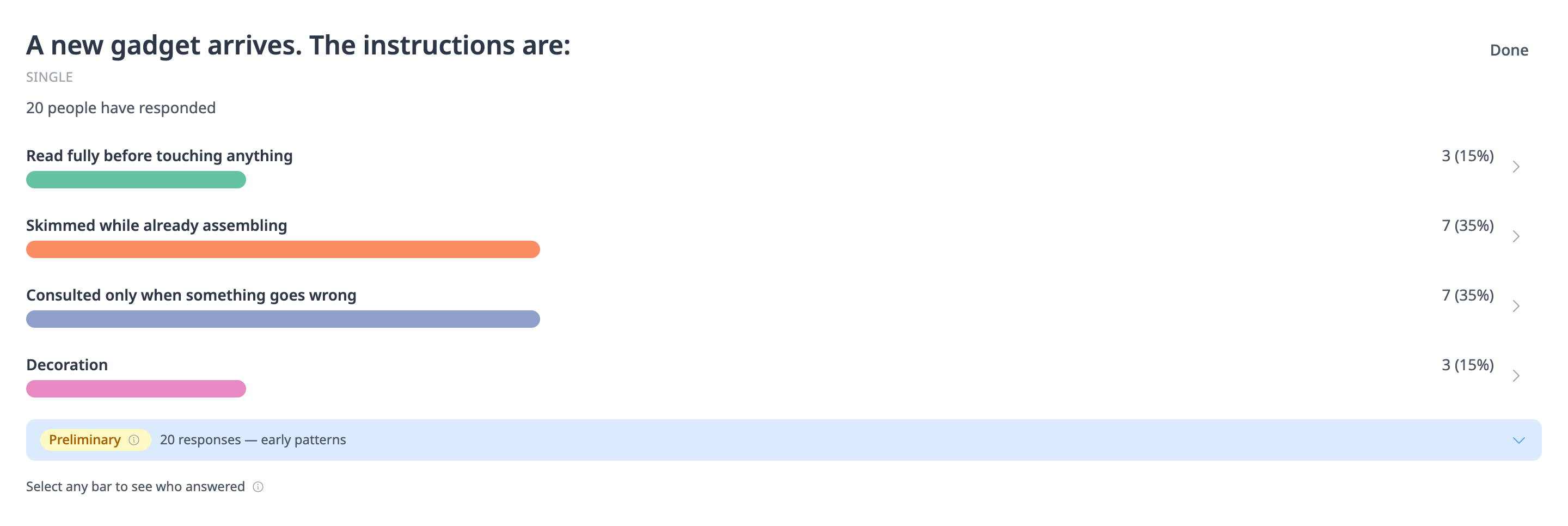
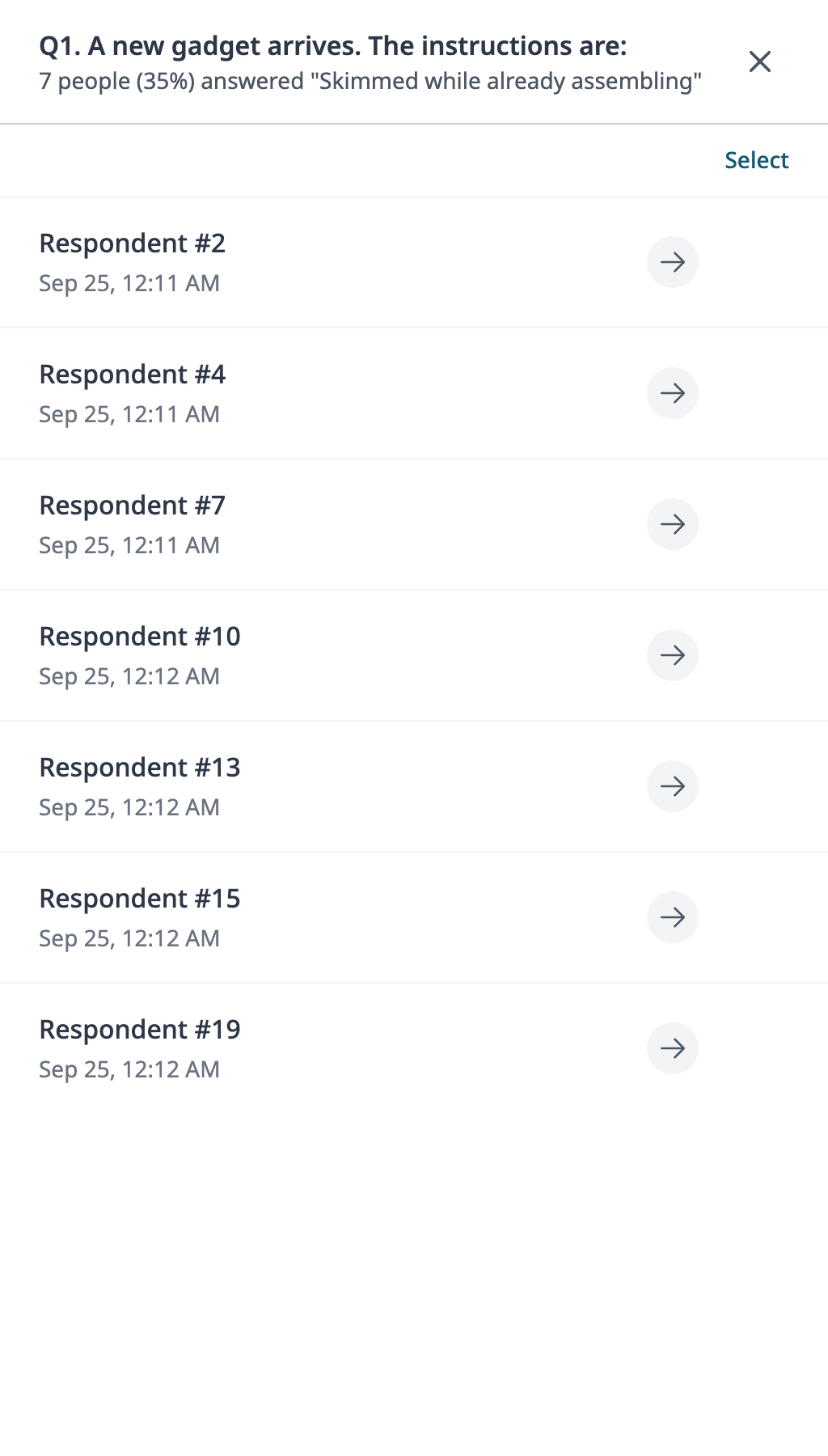
Open the sample survey’s files: the report as a PDF or a Word file, the slides, and the data (CSV). No sign-up needed. Every answer came from made-up people, a few of whom read the instructions. The files are exactly what Candor makes.
Share live results with the groups you name
Circles are groups you define — each one sees only the surveys you’ve shared with them, live as responses arrive.
One account, as many audiences as you need
Create a Circle for each audience — your leadership group, your stakeholders, your volunteers, your colleagues. Each Circle is separate. Members see only the surveys assigned to their Circle.
Assign any survey to any Circle
A single survey can be shared to multiple Circles. Different Circles can see different surveys. You control what each group sees — at any time.
You buy a membership for each person you invite
Each membership is $50/year. You purchase it — they get an email invitation, click to accept, and see results live as responses arrive. Nothing for them to buy.
Research Mode, on every account
Research Mode gives you audit trails, consent management, and IRB documentation — built in.
Tamper-evident audit trail
Every change is timestamped and logged. SHA-256 lets an outside reader check whether the record matches what was stored. That’s tamper-evident, not tamper-proof.
Documents for your ethics submission
Your board — whether it is called an IRB, REB, or ethics committee — asks the same questions about survey tools. The answers are written out, and the supporting documents are ready to attach.
Academic pricing
Discounted pricing for qualifying organizations — auto-applied at signup. You sign up yourself.
Pricing, support, and language, all upfront
Upfront pricing, real support, and a tool that’s ready whenever you need it.
See every limit before you start
Price sits next to the limits. A live survey stays up unless you stop it or the free collection window ends.
Real people, real help
When you request help, you hear back from a person. Same-business-day email support. Help articles anyone can follow.
45 languages
Build and run your whole survey in your own language, one of 45. Full right-to-left support. Native numerals.
Cancel anytime
Pay monthly. Stop anytime. Your first survey is free.
Everything upfront. Plain language. Just surveys.
You collect responses for 30 days after you publish. No credit card.
Start your first survey free