Every plan, every price

$30 a month or $300 a year. First survey free.

Every survey feature comes with every plan.

Candor Free
$0
No credit card required
  • Your first survey is completely free — build it, send it, see results
  • Unlimited questions and responses
  • Collects responses for 30 days after you publish
  • Afterwards, you can still log in, see your results and export them
  • Includes “Powered by Candor” badge
Start your first survey free
Candor Monthly
$30 /month
Every Candor feature. Cancel anytime.
  • Create as many surveys as you need
  • Unlimited questions and responses
  • Collect responses for as long as you’re subscribed
  • No badge on your surveys
Start your first survey free

Your surveys collect responses while your paid Candor subscription is active. When it ends, your results stay accessible to you until you close your account.

Circles — for Candor Annual subscribers and the people they add

Share live results with the groups you name

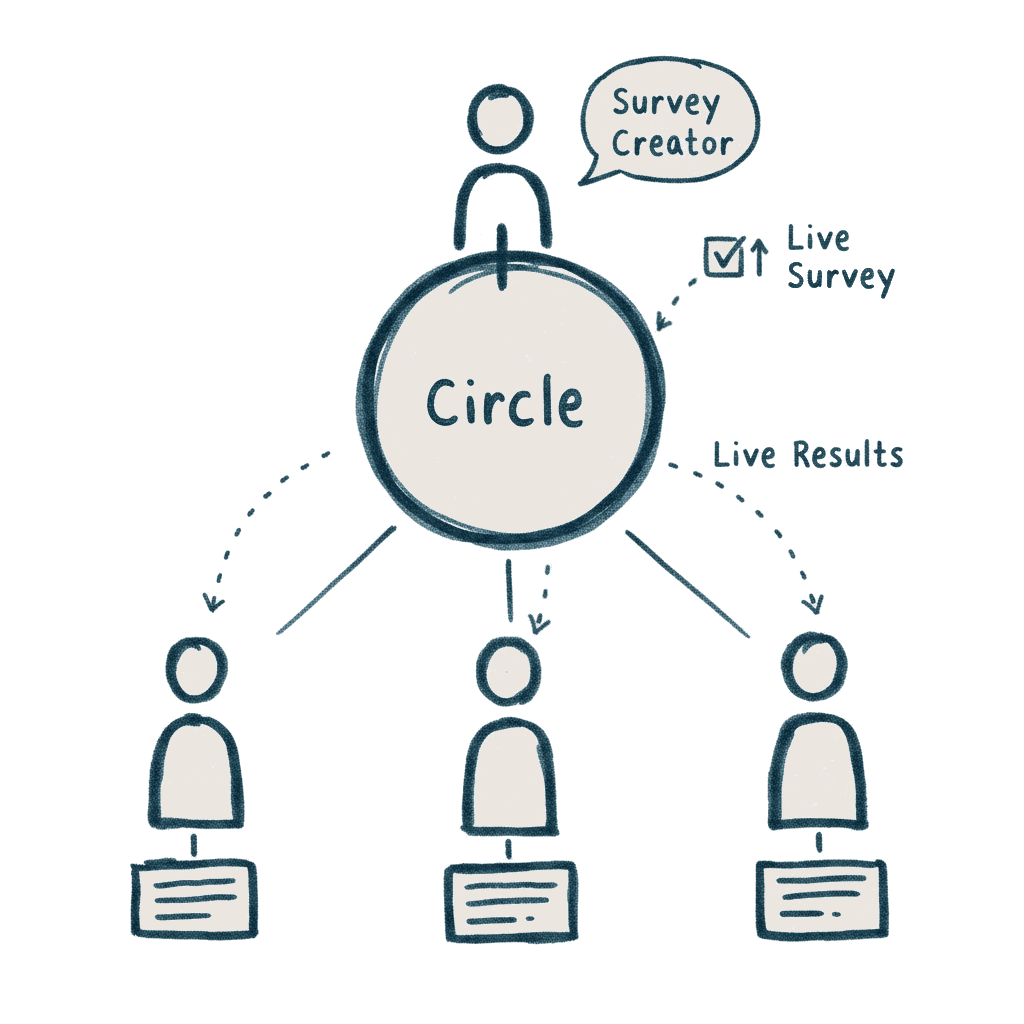
Invite the people who need your results into a Circle. They get their own login and see results live, as responses arrive — only the surveys you’ve chosen to share. Share a survey with the Circle once, and everyone stays current on their own.
Share survey results with your team — Candor Circles
How a Circle Works
  1. You create a Circle and give it a name
  2. You add members — each person needs a Circle Member subscription
  3. You assign surveys to the Circle
  4. You invite members by email — they click to join
  5. They see only the surveys you’ve shared with them — live

Everyone in a Circle subscribes by the year, the person who creates it and everyone they add. Create as many as you need. Candor Annual subscribers can also be members of other subscribers’ Circles.

Discounted pricing

Academic researchers, students, nonprofits, and homeschool families pay $20 a month or $200 a year — and Circle memberships are discounted too. Automatically applied.

See if your work qualifies

On every plan

Everything below comes with Candor Surveys — monthly or annual, and with your free first survey.

Build it

A survey about reading instructions, open for editing on a phone, with the Guide’s tips for writing clear questions
Ready-made templates to start from
Question types for every job — multiple choice, rating scales, ranking, grids, open text, and more
Skip logic — route people past questions that don’t apply
Optional AI suggestions for questions that fit your goal
Scoring and weighting for assessments
Preview exactly what respondents will see

Before you publish

Checks catch incomplete questions, double-barreled wording, and broken skip paths — before anyone sees them
Pilot mode — test first, then keep or set aside the test responses
Edit a live survey without starting over
Undo, unpublish, restore from trash
Scheduled close, with a grace period for stragglers

Send it

Share by link or QR code
Build and run surveys in your own language, 45 of them, right-to-left included
Built for mobile first
Password protection and bot protection
Respondent privacy built in
Save and resume for longer surveys

See your results

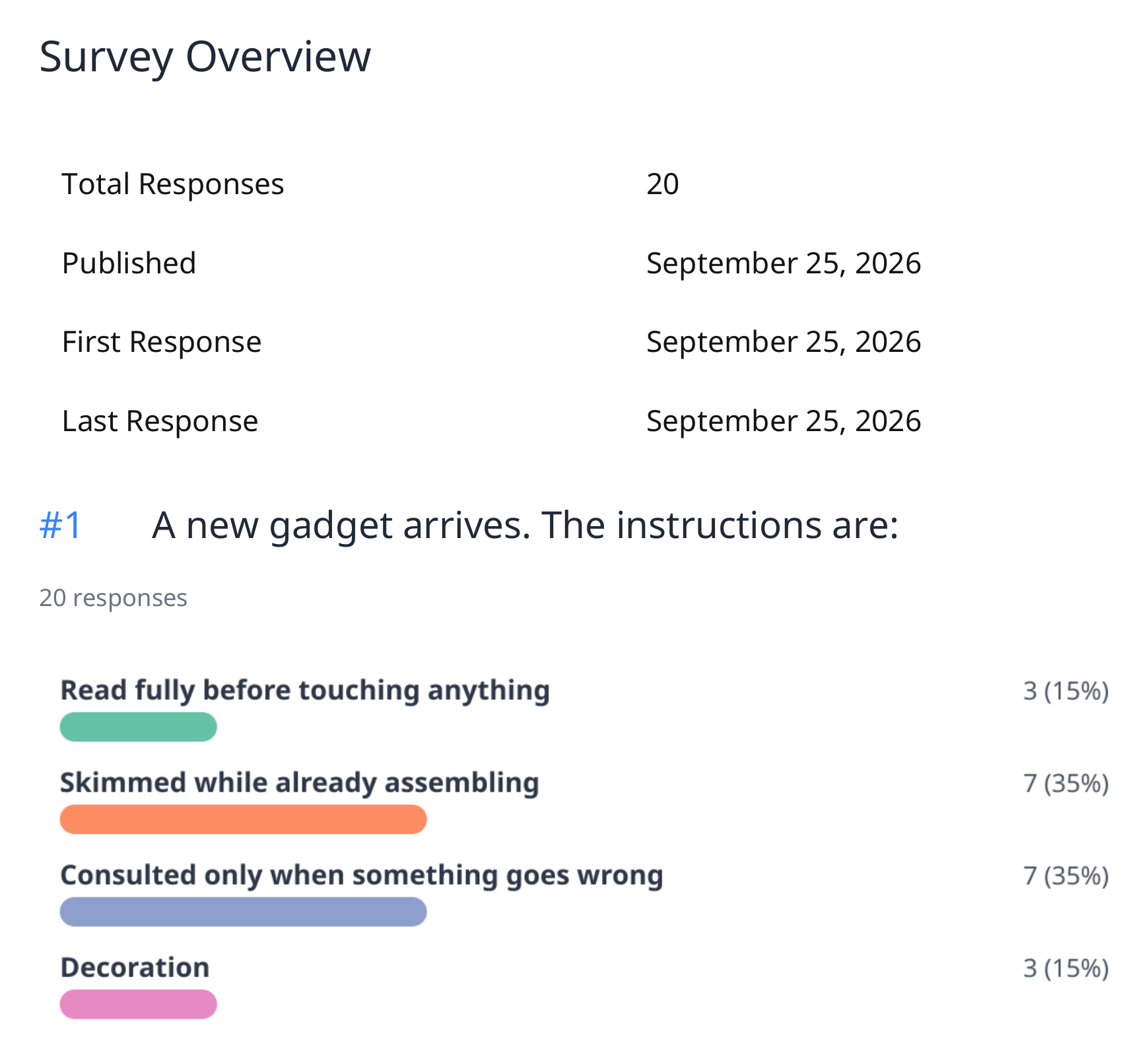
Results on a phone for the survey about reading instructions, full screen: 20 people have responded, and each of the four answers shows a bar, its count and its percentage
Watch responses arrive in real time
Drill down — click a chart and see who said what
Link two questions to see how answers relate
Compare segments side by side
Filters you can save and reuse
Statistical analysis built in — mean, median, standard deviation, margin of error
Bar, column, or pie charts in accessible palettes
Optional AI-suggested themes in open answers
An optional plain-language AI summary of your results
See where people stopped, question by question

Exports

A page of the PDF report: the survey overview, then the first question, each answer a colored bar with its count and percentage
Word, PDF, and PowerPoint reports with charts included
CSV, Excel, and SPSS exports with labeled data
Export exactly the filtered slice an audience needs

For research

Research Mode with a tamper-evident audit trail
Consent pages built into your survey flow

Everywhere

The whole app in your language too — 45 of them
Accessibility built in — keyboard, screen reader, high contrast, large text
A dashboard that keeps every survey organized
Your data stays saved, even if you pause or cancel
A person answers your questions. Not a bot.

Built-in guidance

Guidance appears as you build your survey.

"I’ve seen what surprise pricing does to trust.That’s why Candor shows you everything up front."

— Chuck Boudreau, Founder

Common questions

What do I get on the free 30-day survey?
You get one published survey with unlimited questions and unlimited responses. Your free 30-day survey collects responses from the day you publish it, not from the day you sign up. A small “Powered by Candor” badge sits on that survey. No credit card required to start.
What happens after the free 30-day survey ends?
Your survey stops collecting new responses. You’re still on Candor Free, and your results stay accessible to you until you close your account. You can log in, filter them, chart them and export them, and keep drafting new surveys and trying each on up to 10 people. To publish again, choose Candor Monthly or Candor Annual.
Is the free 30-day survey for everyone?
Everyone starts on Candor Free, and the free 30-day survey is for accounts that have never had a paid Candor subscription (Candor Monthly or Candor Annual). If you had a paid Candor subscription before and stopped, your account stays on Candor Free and keeps everything you built and collected: you can still draft surveys, try each on up to 10 people, and read and export your results. To publish surveys again, choose Candor Monthly or Candor Annual.
What happens to my surveys if I cancel?
Your surveys stay active through the end of your billing period, then stop collecting new responses. You’re on Candor Free from then on, and your results stay accessible to you until you close your account. You can still log in, filter them, chart them and export them, and keep drafting new surveys and trying each on up to 10 people. To publish again, choose Candor Monthly or Candor Annual.
Do I need a Candor Annual subscription?
Only if you want Circles or want two months free. Circles are the ability to share live results with defined groups, each in their own view. If that’s not something you need, Candor Monthly doesn’t include them. Your surveys collect responses while your paid Candor subscription is active. When it ends, you can still log in, see your results and export them. You can switch to a Candor Annual subscription anytime.
Does Candor use AI?
Only if you turn it on. AI help is off in a new Candor account, and you can switch off any AI feature in Settings. Only one feature, Response themes, sends your respondents’ written answers to the AI. See what each AI feature does and sends.

Questions about a plan? Ask us — a person writes back.

Everything upfront. Plain language. Just surveys.

You collect responses for 30 days after you publish. No credit card.

Start your first survey free

Prices shown in USD. Candor accepts many currencies — your local currency and tax are handled automatically at checkout.